


Use SpotOnTask reporting and support channels when content appears unsafe, misleading, abusive, illegal, or inconsistent with the Community Standards. Reporting alerts SpotOnTask for review; it does not automatically cancel a task, reverse a payment, or notify emergency services.
What can be reported directly
Where the control is shown, you can report a task, offer, question, offer reply, or question reply. Open the relevant item, select Report or Report offer, choose the closest category, add a clear comment, and select Send Report.
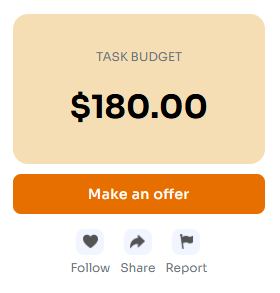
On an open task, select the flag labelled Report.
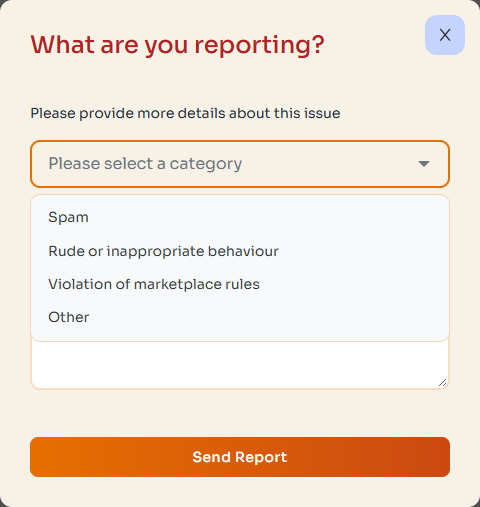
Choose the closest category, explain the concern factually, then select Send Report.
You cannot report your own content, and submitting the same report repeatedly is not necessary. Provide factual details that help identify the issue.
Private task messages
There is no separate report button for an individual private task message. If task chat contains threats, harassment, payment redirection, requests for sensitive information, or other serious concerns, preserve the conversation and contact support through the Help Centre. Include the task ID and identify the relevant message without sending passwords, authentication codes, or full payment details.
When to contact support
- You need help with an assigned task, held payment, cancellation, or completion dispute.
- The report control is unavailable or the concern involves private task chat.
- You have relevant evidence that cannot be explained adequately in the report.
- You believe your account or payment information may be compromised.
Open the Help Centre to create or reply to a support ticket. State whether you are the Poster or Worker, provide the task ID, describe what occurred, and include relevant dates and screenshots where appropriate.
Preserve useful evidence
- Keep task details, offers, agreements, and important decisions on SpotOnTask.
- Retain relevant photos, receipts, dates, and error messages.
- Do not edit screenshots in a way that changes their meaning.
- Remove unrelated personal information before uploading evidence.
Urgent danger or suspected crime
SpotOnTask reports are not an emergency service. If anyone is in immediate danger, contact emergency services. If appropriate, stop work, move to a safe place, and avoid confronting another person. Contact the relevant authority for suspected criminal activity, then notify SpotOnTask when safe to do so.
Reporting is different from cancellation
A report does not automatically change a task or payment status. If you also need to stop an assigned task, use the applicable cancellation controls or contact support. Review any cancellation preview before confirming.
Related articles: