

Check referral progress and reward availability separately. A recorded click does not mean a signup or reward has qualified.
Check tracking first
- Open Invite friends and review Link clicks, Signups, and Qualified.
- Confirm your friend opened your link before signing up, within the 30-day tracking window.
- Check whether they changed browser or cleared cookies. An existing account is not newly referred just by opening a link.

Clicks and signups are different stages. These example numbers do not indicate a payout.
Check the reward status
- On hold: the reward is not yet available. Check the applicable hold period.
- Under review: a payment-related review can freeze the reward.
- Ready for checkout: Poster credits, not withdrawable cash.
- Worker bonus ready: eligible bonuses, subject to cash-out requirements.
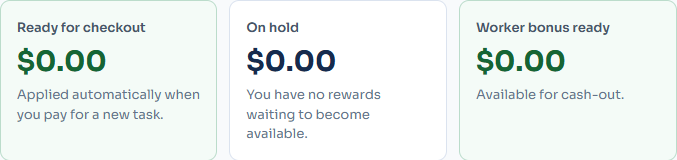
Your page may show different cards depending on eligibility and reward history.
Confirm the related task payment was released and that an applicable campaign was active. Welcome rewards may require a minimum task amount. Campaign limits, expired welcome credits, refunds, and reversals can also affect availability. Very small commissions accumulate rather than becoming an immediately spendable cent.
Still need help?
Use Contact Us. Include your referral code, approximate signup date, relevant task ID, and a screenshot of the status. Do not send passwords, authentication codes, or your friend's identity documents. Do not create another account to retry a referral.