

Your personal referral link connects a friend's signup to your account. A click or signup alone does not guarantee a reward.
Share your link
- Sign in and open Account -> Invite friends.
- Select Copy link, then paste it into a message to your friend. You can also use Share where your browser supports it.
- Ask your friend to open that link before creating their account. Using the same browser helps preserve the referral tracking cookie.
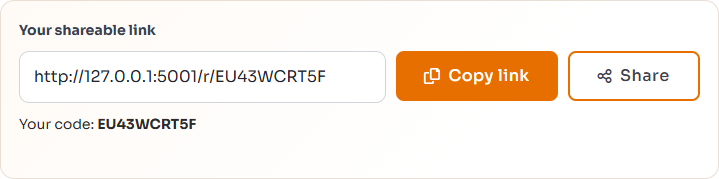
Local demonstration only: do not copy the localhost address shown here. Copy your own link from the live Invite friends page.
Track progress
- Link clicks: recorded visits through your link.
- Signups: new accounts linked to your referral.
- Qualified: referrals associated with a released task payment. Reward eligibility still depends on the applicable campaign.

These example counters show separate stages, not your reward balance.
Signup tracking lasts for 30 days after the latest referral visit. Changing browsers or clearing cookies can prevent a signup from being linked. Existing accounts are not linked simply by opening a referral link.
Check the current offer
On Invite friends, open When can I use my credits? and select Poster or Worker, where available. Check the current reward, hold period, and expiry rules before inviting anyone. Share honestly; do not create fake accounts or tasks to generate rewards.